 |
Disabling iPod's buttons using the Hold switch |
If you're carrying iPod in your pocket and you don't want to press the buttons or turn it on accidentally, you can make the buttons inactive.
|
Set the Hold switch to Hold. |
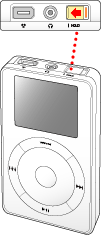
When iPod is set to Hold, you see an orange bar next to the Hold switch. If iPod is turned on, you see a lock icon on the display.