 |
Using iPod's controls |
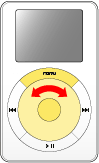
Use the scroll wheel, Select button (in the center of iPod), and Menu button to go back and forth through iPod's menus and to select menu items.
|
To select an item, use the scroll wheel to scroll to the item, then press the Select button. If the item has a right arrow (>) next to it, selecting it leads to another list of choices. Press the Menu button to back up to the previous menu. |
Using the scroll wheel while the Now Playing screen is showing adjusts the volume.
To turn iPod on, press any button. To turn it off, press and hold the Play button. To turn on the backlight, press and hold the Menu button.
| Tell me more |